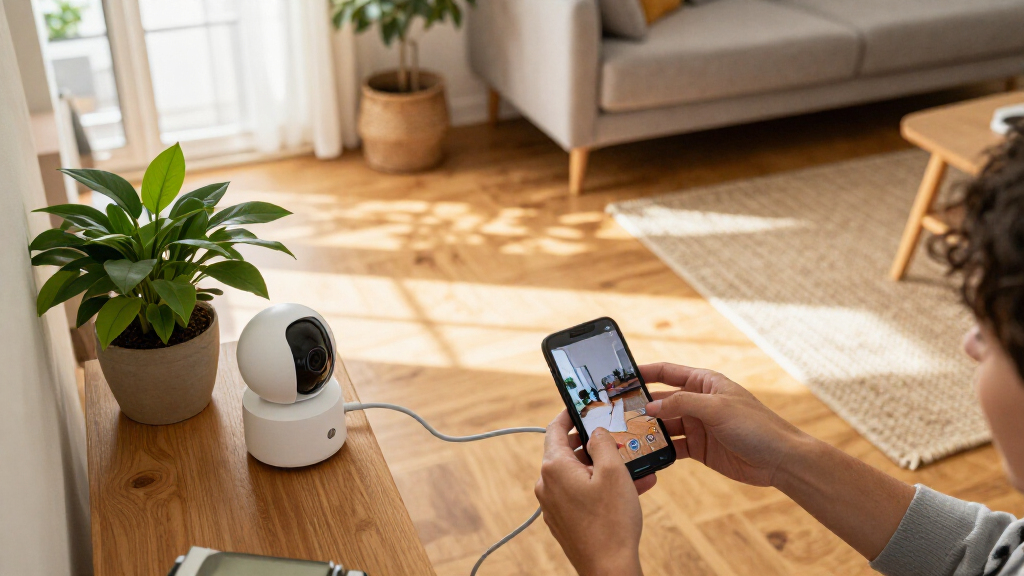
Set up smart home security cameras to monitor selected areas, review recorded footage, and receive alerts on your phone. This guide is for beginners installing one or more indoor or outdoor cameras with a home Wi-Fi network and the camera maker’s app. Allow 1–2 hours, including time to test placement and alerts.

Get home appliances delivered free with Prime
- Fast, free delivery on millions of items
- Prime Video, Amazon Music and more included
- Member-only deals all year

Blink Outdoor 4 Security Camera System with Battery Doorbell 2K+, Sync Module Core, and 5 Cameras, Black
- ✔ Included devices: 5 Outdoor 4 cameras, Battery Doorbell 2K+, Sync Module Core
- ✔ Outdoor camera resolution: 1080p HD
- ✔ Doorbell resolution: 2K (1920 x 1920)
Blink Outdoor 4 Security Camera System with Battery Doorbell 2K+, 3 Cameras and Sync Module Core, Black
- ✔ Included devices: 3 Outdoor 4 cameras, Battery Doorbell 2K+, Sync Module Core
- ✔ Outdoor camera resolution: 1080p HD
- ✔ Doorbell resolution: 2K (1920 x 1920)

ADT Blu Indoor Camera Home Security System with 2K Video
- ✔ Included components: Base hub, 2K camera, door/window sensor, motion sensor, yard sign, window stickers
- ✔ Camera resolution: 2K; 4 MP effective still resolution
- ✔ Night vision range: 20 feet
Difficulty: Beginner | Time: 1–2 hours
What You’ll Need
Tools & Materials:
- Smart home security camera and its power adapter, batteries, or mounting hardware
- Smartphone or tablet compatible with the camera app
- Home Wi-Fi name and password
- Ladder and screwdriver for a mounted camera
- Optional: microSD card or subscription for cloud recording
Knowledge:
- Basic smartphone app use
- Ability to connect a phone to home Wi-Fi
- For outdoor installation, basic safe ladder use
Check the camera’s supported Wi-Fi bands, operating temperature, weather rating, recording options, and power requirements before installation. Choose a location with a reliable signal and access to power or a charging route. Check local rules before recording shared areas, neighbors’ property, or audio.
Blink Outdoor 4 Security Camera System with Battery Doorbell 2K+, Sync Module Core, and 5 Cameras, Black
For homes that need several exterior sightlines, this five-camera bundle offers the broadest camera coverage in this lineup. It includes five Outdoor 4 cameras, a 2K Battery Doorbell, and a Sync Module Core, giving us more positions to cover than the three-camera Blink kit. That extra reach can help when we want to monitor multiple entrances, a driveway, and other parts of a property without assembling a system device by device.There is a clear resolution split: the doorbell records square 2K video, while the five outdoor cameras record 1080p HD. Compared with ADT Blu, this is the stronger fit for exterior coverage; ADT instead combines one indoor camera with entry and motion sensors. The Blink cameras support night vision, two-way audio, and weather-resistant use, and the stated battery life is up to two years under default settings. Actual battery life depends on use and conditions, and the supplied AA lithium batteries are non-rechargeable.The additional cameras only pay off if we have places to install them and sufficient 2.4 GHz Wi-Fi coverage. Person and vehicle alerts and cloud clip storage require a separately sold Blink plan, so we should check those ongoing requirements against our monitoring needs. For a smaller property or fewer outdoor zones, the three-camera Blink bundle preserves the same doorbell and camera types with less coverage capacity.
Pros:
- Includes five 1080p outdoor cameras, a 2K doorbell, and a Sync Module Core.
- Two-way audio and night vision support remote checks and visitor conversations.
- Outdoor 4 cameras are weather-resistant and rated for temperatures from -4°F to 113°F.
- Doorbell can use existing wiring to sound an indoor chime.
Cons:
- Outdoor cameras and doorbell use non-rechargeable AA lithium batteries.
- Person and vehicle alerts and cloud clip storage require a separately sold plan.
- Connects over 2.4 GHz Wi-Fi.
Best for: Households that want to cover several outdoor areas with one battery-powered camera and doorbell system.
Not ideal for: Buyers who need rechargeable camera batteries, 5 GHz Wi-Fi, or included person detection and cloud clip storage without a separate plan.
Bottom line: We’d choose this bundle when five outdoor camera positions make a meaningful difference and we’re comfortable with its battery and plan requirements.
“We’d choose this bundle when five outdoor camera positions make a meaningful difference and we’re comfortable with its battery and plan requirements.”
Blink Outdoor 4 Security Camera System with Battery Doorbell 2K+, 3 Cameras and Sync Module Core, Black
This three-camera kit keeps the same core mix as the five-camera option—Outdoor 4 cameras, a 2K doorbell, and Sync Module Core—but suits homes that need fewer exterior viewpoints. We can place cameras at the most important approaches without taking on two extra devices. Its role is a more focused outdoor setup, not a different camera system: the video resolutions, battery approach, and plan-dependent features are broadly the same as in the larger Blink bundle.The doorbell’s square 2K view is the higher-resolution part of the system; each Outdoor 4 camera captures 1080p HD with a 143-degree diagonal field of view. Night vision and two-way audio give us basic remote monitoring and conversation, while weather-resistant construction supports outdoor placement within the stated operating range. The cameras’ battery life is listed as up to two years on default settings, but traffic, settings, and conditions affect how often we replace the non-rechargeable batteries.Compared with the five-camera bundle, the obvious compromise is fewer camera positions, which matters if we need to watch a detached garage or several sides of a larger property. Compared with ADT Blu, this kit is built around outdoor cameras and a doorbell rather than an indoor camera plus door and motion sensors. It connects on 2.4 GHz Wi-Fi, and some useful detection and cloud clip features require a separate Blink plan.
Pros:
- Combines three outdoor cameras, a 2K doorbell, and a Sync Module Core.
- Outdoor cameras include night vision and two-way audio.
- Weather-resistant cameras are rated from -4°F to 113°F.
- Smaller camera count than the five-camera bundle can suit a more limited coverage plan.
Cons:
- Non-rechargeable batteries mean eventual replacements for each camera and the doorbell.
- Some person and vehicle detection and clip features require a separate Blink plan.
- Supports 2.4 GHz Wi-Fi.
Best for: People who want Blink’s battery-powered outdoor camera and doorbell combination for a few key areas around the home.
Not ideal for: Owners of larger properties who need more than three outdoor viewpoints, or buyers seeking rechargeable power and plan-free advanced alerts.
Bottom line: We’d pick the three-camera version when its coverage is enough, since it retains the five-camera bundle’s doorbell and camera types without adding two more outdoor units.
“We’d pick the three-camera version when its coverage is enough, since it retains the five-camera bundle’s doorbell and camera types without adding two more outdoor units.”
ADT Blu Indoor Camera Home Security System with 2K Video
ADT Blu takes a different route from the Blink bundles: rather than providing several outdoor camera positions, it combines a 2K indoor camera with a base hub, door/window sensor, and pet-friendly motion sensor. That mix makes it a more complete starting point for watching an interior room and monitoring whether an entry point or indoor area triggers a sensor. The physical privacy cover is also a useful distinction from the Blink cameras, since it can block the lens when we want the camera closed.The camera provides night vision, motion detection, two-way audio, and app control through ADT+. The kit also includes a yard sign and window stickers, though it is designed for indoor camera use. A base with cellular backup is listed, which may add a backup connection for the base; we should not mistake that for a camera intended to watch the yard. Sensors can be installed with adhesive or screws, giving us some flexibility during a DIY setup.Compared with either Blink option, ADT Blu includes sensors but far fewer cameras and no stated outdoor camera coverage. Its main tradeoff is ongoing service: monitoring requires a paid subscription after the 30-day introductory offer for eligible new customers. The plans are described as month-to-month and cancellable, but the ongoing requirement still makes this a less self-contained choice than a camera kit without that monitoring condition. It is best for buyers who want an indoor sensor-based system and accept that service model.
Pros:
- Pairs a 2K indoor camera with a door/window sensor and pet-friendly motion sensor.
- Physical privacy cover blocks the camera lens.
- Includes night vision, motion detection, and two-way audio.
- DIY setup supports adhesive or screw-mounted sensors.
Cons:
- Paid monitoring is required after the introductory offer for eligible new customers.
- Camera is designed for indoor use, unlike the outdoor coverage in the Blink bundles.
- The listed warranty is 90 days on eligible equipment parts.
Best for: Households seeking an indoor camera with door/window and motion sensors, app access, and a physical privacy cover.
Not ideal for: Anyone needing outdoor camera coverage or unwilling to pay for monitoring after the introductory offer.
Bottom line: We’d choose ADT Blu for indoor camera and sensor coverage when we accept its paid monitoring requirement and don’t need outdoor cameras.
“We’d choose ADT Blu for indoor camera and sensor coverage when we accept its paid monitoring requirement and don’t need outdoor cameras.”
As an Amazon Associate we earn from qualifying purchases.
Before You Start
Decide what you need to monitor, such as a doorway, driveway, or room entrance. Aim to capture useful activity while limiting views of private areas. Outdoor cameras should be mounted where rain exposure and tampering risks match the device’s rating and installation instructions. Do not mount a camera above a height you cannot safely reach for maintenance.
Use a unique password for the camera account and turn on two-factor authentication if available. If you plan to store footage locally, confirm the required card type and maximum capacity. A cloud plan may be required for certain recording or notification features.
Step-by-Step Instructions
Step 1: Choose the areas to monitor
Walk through the home and identify the specific entry points or areas you want the cameras to cover. Note what each camera needs to capture: a face near a doorway, a wide view of a driveway, or movement through a room. Avoid pointing cameras into bedrooms, bathrooms, or areas where people expect privacy. Check whether the view would include a neighbor’s window, sidewalk, or shared space, and adjust the planned angle to limit unnecessary recording.
Tip: A camera cannot monitor an area blocked by a wall, dense foliage, or a closed door. Sketching the view before drilling helps prevent a second mounting attempt.
Check: You have a short location list and know what visible activity each camera should capture.
Step 2: Check Wi-Fi and power at each location
Take your phone to each planned camera location and check that it remains connected to your home Wi-Fi. If the camera maker’s app includes a signal test, use it too. Identify a suitable power outlet, battery charging plan, or approved outdoor power connection. Keep cables away from walkways, water, and places where doors or windows can pinch them.
Tip: A phone showing Wi-Fi bars does not guarantee a camera will connect; devices can support different bands. Check the camera’s specifications and router settings if setup fails.
Check: Each location has compatible Wi-Fi coverage and a safe, practical power source.
Step 3: Create and secure your camera account
Install the official app from your phone’s app store. Create an account or sign in, using a unique password that you do not reuse for other services. Turn on two-factor authentication if the app offers it. Review account recovery details, and install any available app updates before pairing the camera.
Tip: Download the app named in the camera’s manual or packaging. Avoid setup links sent in unsolicited messages.
Check: You can open the official app, sign in, and access its device setup screen.
Step 4: Power on and add the camera
Place the camera near the router for initial setup, then connect its adapter or charge and insert the battery according to the manual. Open the app and choose its add-device or setup option. Scan the camera’s QR code or enter its identification details as directed. Follow the prompts to connect it to the correct Wi-Fi network and enter the password. Wait for the app to confirm pairing before moving on.
Tip: Some cameras connect only to a particular Wi-Fi band or need your phone to join a temporary setup network. Follow the app’s instructions rather than changing router security settings at random.
Check: The camera appears in the app with an online or connected status and a live preview.
Step 5: Update the camera and choose recording settings
Open the camera’s settings and check for a firmware update. Keep the camera powered and connected while the update installs. Then choose whether it should record continuously, record when motion is detected, or save clips manually. Select cloud storage or insert a supported memory card if required. Review clip length, retention period, and storage limits so you know when old footage will be deleted or recording will stop.
Tip: Continuous recording uses more storage and may need a subscription or a camera designed for that feature. Check the plan and local-storage limits before relying on a recording mode.
Check: The app shows the intended recording mode and a valid storage destination.
Step 6: Set motion zones and useful alerts
Use the app’s motion-zone controls to mark the parts of the image that matter, such as a path to a door. Exclude moving trees, busy roads, or other areas that cause irrelevant alerts. Set detection sensitivity and choose the notification types you want. If person, vehicle, or package detection is available, enable only the categories that fit your needs. Test alerts while you are nearby, then adjust settings if normal activity triggers too many.
Tip: Keep app notifications enabled in your phone’s system settings. A camera can detect motion without displaying an alert if the phone blocks notifications.
Check: The camera detects activity in the selected area and your phone receives the alert you chose.
Step 7: Mount the camera and aim its view
Take the camera to its chosen position and check the live preview before drilling or attaching hardware. Aim it to capture the target area without exposing more private space than necessary. For an outdoor camera, follow the maker’s mounting and weatherproofing directions. Secure the bracket with the supplied fasteners or suitable hardware for the wall surface, then attach the camera and tighten its adjustment points. Do not leave cables hanging where they can be pulled or damaged.
Tip: For a battery-powered camera, confirm you can remove it for charging without a difficult or unsafe climb.
Check: The live preview shows the intended area, the camera is firmly attached, and its power connection is protected.
Step 8: Test the full recording and alert flow
Walk through the monitored area or ask another household member to do so. Check that the camera records a clip, the app delivers the expected alert, and playback shows the event clearly. Review the image during daytime and, for a camera with night vision, in low light. Check the date and time displayed for clips, and confirm audio settings match your choices and local requirements. Adjust the angle, motion zone, or sensitivity and repeat the test if footage misses the event.
Tip: Do not assume a live preview proves recording works. Open a saved clip to confirm footage is actually stored and can be played.
Check: A test event appears in the recording history, plays back clearly, and produces the selected notification.
Step 9: Review privacy and household access
Open the privacy, sharing, and account settings. Limit access to people who need it, and use individual accounts if the service supports them. Check whether the camera records audio, when it records, and who can view saved clips. Set a retention period that fits your needs. Tell household members where cameras are placed and how alerts and recordings work.
Tip: If you share access, remove it when someone no longer needs it. A shared account password is harder to manage safely than separate authorized accounts.
Check: You know who can view footage, how long clips remain available, and which privacy settings are active.
Common Mistakes to Avoid
- Mounting the camera before checking its Wi-Fi connection. — Test the camera or phone signal at the planned spot before drilling; confirm the camera’s supported Wi-Fi band.
- Leaving motion zones wide open, causing repeated alerts from roads or trees. — Exclude irrelevant parts of the image, start with moderate sensitivity, and test before relying on alerts.
- Assuming the live view means clips are being saved. — Check storage settings and play back a test recording from the app.
- Aiming a camera into a neighbor’s private area or recording more than needed. — Frame the view around your own entry points, review privacy controls, and check applicable local rules.
Troubleshooting
Problem: The camera will not connect to Wi-Fi.
Solution: Move it closer to the router during setup, confirm the network password and supported Wi-Fi band, and restart the camera and app. Follow the manual’s reset procedure only if ordinary setup steps fail.
Problem: The app shows the camera offline after mounting.
Solution: Check power or battery charge, then test Wi-Fi signal at the mounted position. Move the camera or improve coverage with a compatible access point if signal is weak.
Problem: You receive too many motion alerts.
Solution: Narrow the motion zone, lower sensitivity, or disable detection categories that do not help. Test the updated settings with ordinary activity in view.
Problem: No recording appears after a motion event.
Solution: Check that motion recording is enabled, a storage destination is configured, and the card or cloud plan is active. Confirm the camera has the correct time and can reach the network.
What Success Looks Like
The completed setup has each camera online in the app, firmly mounted or safely positioned, and aimed at the intended area. A test event creates a playable recording, the selected phone alert arrives, and the image is clear enough to identify relevant activity in the lighting conditions you expect. Storage, account access, and privacy settings match your choices.
Next Steps
Check the camera app periodically for offline status, storage limits, and firmware updates. Clean the lens when the image becomes hazy, trim foliage that enters motion zones, and recharge or replace batteries before they run low. After moving the router, changing Wi-Fi details, or rearranging a room, repeat the recording and notification test. Review shared users and clip retention when household needs change.
Frequently Asked Questions
Do smart security cameras need a subscription?
It depends on the model and the features you want. Some cameras offer local storage without a subscription; cloud history, longer clip retention, or advanced detection may require a paid plan. Check the camera’s plan details before choosing a recording setup.
Can I install a camera without drilling?
Some indoor cameras sit on a shelf, and some models support adhesive or magnetic mounts. Use a mounting method approved for your camera and surface, and check that the camera cannot fall or be easily moved out of view.
Why does my camera record, but my phone does not alert me?
Check motion notifications in the camera app, the camera’s detection zone, and your phone’s notification permissions. Also check scheduled quiet hours or notification modes that may suppress alerts.
Will a camera keep recording if the internet goes down?
Some cameras can save footage to local storage during an internet outage, while others rely on a cloud connection. Check the model’s documentation and test its offline behavior before relying on it.
How can I reduce false alerts at night?
Adjust the motion zone to exclude reflective surfaces and moving branches, then lower sensitivity in small steps. Check the night image for glare from nearby lights or surfaces, and retest after each change.
Cold & flu season Picks

Blueair 2-in-1 Air Purifier and Humidifier for Rooms up to 1,726 sq. ft.
As an affiliate, we earn on qualifying purchases.