
Choosing a smart home voice assistant is less about which speaker sounds cleverer and more about which one can reliably control the devices and services your household already uses. Amazon Alexa and Google Assistant are the two familiar choices, but they lead with different strengths: Alexa has a broad smart home ecosystem and extensive routines, while Google Assistant connects naturally with Google Search, Calendar, Maps, and other Google services.

Get home appliances delivered free with Prime
- Fast, free delivery on millions of items
- Prime Video, Amazon Music and more included
- Member-only deals all year

Amazon Echo Dot Max with Smart Plug Bundle
- ✔ Smart home hub: Zigbee, Matter, Thread Border Router
- ✔ Sensors: Temperature, light, presence, accelerometer
- ✔ Audio: 0.8-inch tweeter and 2.5-inch woofer
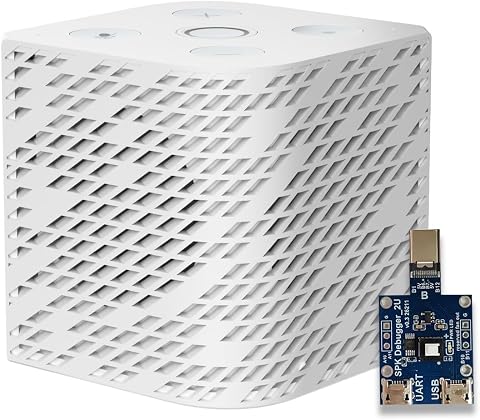
Third Reality Voice/Music Assistant Dev Edition
- ✔ Platform: Linux with Home Assistant OS
- ✔ Processor: Quad-core ARM A53
- ✔ Memory: 256 MB RAM
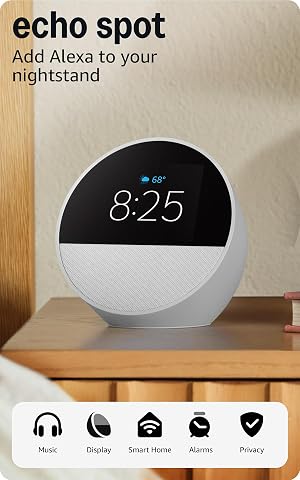
Echo Spot Smart Alarm Clock – Glacier White
- ✔ Display: 2.83-inch touchscreen, 240 × 320 pixels
- ✔ Camera: None
- ✔ Wi-Fi: Dual-band 2.4 and 5 GHz
That difference matters most when you add devices or ask for help by voice. Alexa is often the safer starting point for a mixed collection of smart plugs, lights, locks, and appliances, though compatibility still depends on each product. Google Assistant is appealing if your household already lives in Google apps and values answers that draw on search. Neither choice guarantees that every device works or every command is understood. Choose based on your devices, daily habits, and tolerance for account and privacy tradeoffs.
At a Glance
| Criteria | Amazon Alexa | Google Assistant | Winner |
|---|---|---|---|
| Smart home device compatibility | Broad selection of compatible products and third-party integrations; check individual device support. | Supports many popular smart home products, though the available range can be narrower or vary by region. | A |
| Voice search and everyday questions | Useful general assistant with access to Amazon services and supported third-party skills. | Strong connection to Google Search and Google services for many everyday questions. | B |
| Routines and automation | Flexible routines and a large ecosystem of skills; setup and features vary by device. | Supports household routines and device control; available actions depend on products and setup. | A |
| Google and Amazon service integration | Strong fit with Amazon shopping and services; less native value for Google app users. | Natural fit for Google accounts and services; less integrated with Amazon shopping. | Depends |
| Privacy and account controls | Offers settings for voice recordings and account controls; privacy depends on configuration and household use. | Offers Google account activity and voice settings; privacy depends on configuration and household use. | Depends |
| Device choice and cost | Many Echo price points and frequent discounts; some features and devices cost extra. | Nest devices span several price points; paying extra makes sense when Google features suit your home. | Depends |
Amazon Echo Dot Max with Smart Plug Bundle
The Echo Dot Max bundle is our top pick for households that want one Alexa speaker to connect devices, run routines, and control an appliance from the box. Its built-in hub supports Zigbee, Matter, and Thread, a combination that gives it a wider stated smart-home role than the Spot. Temperature, ambient-light, and presence sensors can also inform routines, so the speaker can respond to conditions in its room instead of waiting for a spoken command. The included Smart Plug extends Alexa control to compatible appliances that have a physical on/off switch.Compared with the compact Echo Spot, the Dot Max is better suited to being a room’s smart-home anchor: it has hub protocols and sensors, as well as a woofer, tweeter, and automatic room adaptation for fuller sound. It also offers eero coverage extension, although that feature requires a compatible eero network and has limits on speed and connected devices. The bundle asks us to accept a larger footprint and Alexa-centered setup, and the smart plug cannot make every appliance smart. Choose it when broad device connectivity and routines matter more than a bedside screen; skip it if your home is built around Home Assistant or you do not want the eero requirements attached to its network extension feature.
Pros:
- Built-in Zigbee, Matter, and Thread Border Router support
- Presence, temperature, and light sensors can support routines
- Woofer, tweeter, and room-adaptive playback
- Includes a Smart Plug for compatible appliances
Cons:
- eero coverage extension requires a compatible network and has device and speed limits
- Smart Plug only works as intended with appliances that have a physical on/off switch
- Alexa ecosystem is a poor fit for buyers prioritizing local Home Assistant control
Best for: Alexa households that want a smart-home hub, room sensors, stronger speaker hardware, and a bundled plug for a compatible switched appliance.
Not ideal for: Home Assistant-first users, people seeking a clock display, or households whose appliances cannot remain on when power is restored.
Bottom line: Choose the Dot Max bundle when Alexa device control, sensor-based routines, and a useful included plug make it the strongest all-round fit.
“Choose the Dot Max bundle when Alexa device control, sensor-based routines, and a useful included plug make it the strongest all-round fit.”
Third Reality Voice/Music Assistant Dev Edition
For a home already organized around Home Assistant, the Third Reality Voice/Music Assistant Dev Edition has a clear advantage over the Alexa devices: it arrives with Home Assistant Voice Assistant and Music Assistant and is designed for an open, customizable Linux environment. That makes it a better fit for people who want to shape their voice setup around their own system. Dual digital microphones support voice capture, and the integrated 3 W speaker means local text-to-speech and music playback do not require another audio device.Its compact cube is more of a smart-home project component than a polished bedside Alexa appliance. Unlike the Dot Max, the provided specifications do not list Zigbee, Matter, or Thread hub support, and Wi-Fi is limited to 2.4 GHz. Its 256 MB of RAM and 512 MB of storage also set expectations: this is for focused assistant use and experimentation, not a platform with lots of headroom for demanding additions. Choose it for a local-first Home Assistant environment where customization is a benefit. If you want a ready-made Alexa experience, richer described speaker hardware, or a visible clock, the Echo Spot or Dot Max is the more direct option.
Pros:
- Preloaded with Home Assistant Voice Assistant and Music Assistant
- Open Linux platform supports customization and access to live logs
- Dual digital microphones for voice capture
- Integrated 3 W speaker supports local playback and text-to-speech
Cons:
- 2.4 GHz Wi-Fi only
- 256 MB RAM and 512 MB storage constrain expansion
- More specialized setup than the Alexa-based Echo products
Best for: Home Assistant hobbyists who want a compact voice endpoint with preloaded assistant software and an open Linux platform to customize.
Not ideal for: Buyers seeking a conventional Alexa speaker, broad wireless-band support, or a device with substantial memory for expansion.
Bottom line: Pick Third Reality when Home Assistant compatibility and customization matter more than a mainstream assistant ecosystem or extra hardware headroom.
“Pick Third Reality when Home Assistant compatibility and customization matter more than a mainstream assistant ecosystem or extra hardware headroom.”
Echo Spot Smart Alarm Clock – Glacier White
The Echo Spot makes sense when our priority is an alarm clock that can also answer voice requests and control compatible smart-home devices. Its 2.83-inch touchscreen shows a customizable clock face and can display information such as weather or song titles. Because there is no camera, it is a simpler fit for a bedroom where a camera is unwelcome. The built-in Alexa speaker handles music and spoken responses, and dual-band Wi-Fi supports both 2.4 and 5 GHz networks.Compared with the Dot Max, the Spot is more focused on the bedside experience than on serving as a device hub: the product details describe compatible-device control but do not specify Zigbee, Matter, or Thread support, nor room sensors. Compared with the Third Reality, it offers a visible display and the mainstream Alexa assistant instead of a Home Assistant-centered Linux platform. It also includes eero Built-in, but that feature is subject to the stated limits, including support for up to ten devices on the 5 GHz band and speeds up to 100 Mbps. Buyers should also consider its constrained Bluetooth compatibility and Sidewalk bandwidth use if the feature is enabled. Choose it for clock-first convenience; look elsewhere if your main goal is broad smart-device integration or local-first customization.
Pros:
- Touchscreen shows a customizable clock face and useful glanceable information
- Alexa voice control can manage reminders, music, and compatible smart-home devices
- No camera
- Dual-band Wi-Fi and built-in eero extension capability
Cons:
- No camera for video calls or facial recognition features
- Bluetooth support has compatibility limitations
- eero extension has speed and device limits, and Sidewalk uses some bandwidth unless disabled
Best for: Alexa users who want a compact bedside alarm clock with a customizable display, voice control, and no camera.
Not ideal for: Buyers who need specified Zigbee, Matter, or Thread hub support, Home Assistant customization, or unrestricted Bluetooth compatibility.
Bottom line: Choose the Echo Spot when a visible bedside clock and familiar Alexa control matter more than the Dot Max’s specified hub and sensor features.
“Choose the Echo Spot when a visible bedside clock and familiar Alexa control matter more than the Dot Max’s specified hub and sensor features.”
As an Amazon Associate we earn from qualifying purchases.
Key Differences
The biggest practical distinction is ecosystem breadth versus service fit. Alexa is often the more flexible choice when a home contains devices from several brands, or when the owner wants to build voice commands and routines around them. Google Assistant makes more sense when Google apps are already central to daily life and the assistant is expected to answer questions, manage familiar services, and control a smaller set of compatible devices. Device compatibility changes by product, region, and generation, so checking the exact model matters more than relying on a brand-level promise.
Neither assistant is a universal winner for sound quality, privacy, or value. Those depend on the speaker or display selected, settings, subscriptions, and how much the household trusts each company with account activity and voice interactions. The useful decision is whether Alexa’s wider automation options solve a real problem in your home, or whether Google’s service integration saves enough effort to matter every day. Avoid paying for a premium speaker simply to get an assistant you could use on a less expensive compatible device.
Detailed Comparison
Smart home device compatibility (Amazon Alexa wins — moderate)
Alexa generally has the edge in the breadth of smart home products and third-party integrations. That is a moderate advantage for households combining brands, where support for a specific plug, lock, or appliance can determine whether voice control is practical. Google Assistant supports many popular products, but compatibility can be more limited or depend on the product generation and setup. Neither assistant should be chosen without checking the exact devices you intend to control.
Voice search and everyday questions (Google Assistant wins — moderate)
Google Assistant is often the stronger fit for questions that benefit from Google Search and for people already using Google services. Alexa handles common questions and commands well, but its appeal leans more toward smart home control and Amazon services. The difference is moderate if voice search is a daily habit and minor if you mainly ask either assistant to set timers, play media, or switch off lights.
Routines and automation (Amazon Alexa wins — moderate)
Alexa offers a broad range of routines and skills, giving it a moderate advantage for users who want to combine devices and actions into custom voice commands or schedules. Google Assistant also supports routines, and may be all a simpler household needs. The practical gap is largest when you want to automate across multiple brands; for a few lights and a thermostat, either may be enough.
Integration with daily services (major difference)
Google Assistant is the natural choice when household calendars, email, navigation, and other daily services are already centered on Google accounts. Alexa fits better for people who use Amazon services or want shopping-related commands. This is a major difference only when one ecosystem already shapes daily routines; otherwise, the winner depends on which services you actually use.
Privacy and account controls (major difference)
Both options provide account settings that let users manage voice recordings and activity, but the details and available controls can change. There is no universal winner: the more relevant question is which company’s account and data practices you are comfortable with, and whether you will review its settings. This is a major personal fit issue for privacy-conscious households, even though there is no simple feature comparison that settles it.
Device choice and cost (minor difference)
Amazon offers a wide range of Echo devices and prices, while Google’s Nest lineup provides options for different rooms and budgets. There is no clear assistant-level winner because pricing, sound, display features, and availability depend on the particular model and current offers. The difference is minor if you buy an entry-level speaker; at higher prices, pay for better audio or a display only if you will use those features.
Amazon Alexa: Pros and Cons
Pros:
- Broad smart home product and service ecosystem
- Flexible routines and a large range of skills
- Echo devices available across several price points
Cons:
- Less natural fit for households centered on Google services
- Compatibility and features vary by device and region
- Some capabilities depend on accounts, subscriptions, or specific hardware
Google Assistant: Pros and Cons
Pros:
- Strong fit with Google Search and Google services
- Convenient for households already using Google accounts and apps
- Nest devices offer options for different rooms and needs
Cons:
- Compatible device range may be narrower than Alexa’s
- Less suited to people who rely heavily on Amazon services
- Features vary by product generation and setup
Who Should Choose What
Choose Amazon Alexa if:
- You have smart home devices from several brands and want a broad range of control options.
- You expect to build custom routines that combine lights, plugs, sensors, and other compatible products.
- Your household already uses Amazon services or prefers the available Echo device choices.
Choose Google Assistant if:
- You rely on Google services and want voice access to familiar account features.
- You often ask questions where Google Search integration is useful.
- Your smart home is relatively simple and the specific devices you own support Google Assistant.
Skip both if: Skip both if you want to avoid cloud-connected voice assistants, or if your essential devices do not reliably support either platform. Use manufacturer apps or local controls instead.
Value for Money
Value depends more on the assistant’s fit than on a small difference in speaker price. Alexa can justify choosing an Echo when its compatibility or routines let you control devices you already own without replacing them. Google Assistant can be better value when Google services are part of daily life and its integration saves you repeated steps. If you only need a timer and a couple of lights, buy an affordable compatible speaker; paying more for a screen, stronger audio, or a premium model is worthwhile only if those features have a job in your home.
Check the total cost before deciding: some devices require a separate hub, certain services require subscriptions, and features can vary across generations. A cheap speaker is poor value if it cannot control the lock or lighting you care about. Confirm compatibility first, then compare the hardware you would actually buy.
Final Verdict
For a mixed-brand smart home where device support and flexible routines matter most, choose Amazon Alexa. It is the stronger default for people building a home around voice control and automation. Choose Google Assistant if your household runs on Google services and voice search is as important as controlling devices; its integration can make everyday use feel more natural.
The deciding factor is the ecosystem you already use and the exact devices you need to control. Check compatibility before buying, then select a speaker on sound, display, and price rather than assuming a more expensive model gives you a better assistant. If neither platform supports your essential devices or you prefer not to use a cloud assistant, skip both.
Frequently Asked Questions
Which smart home voice assistant works with more devices?
Alexa generally offers broader smart home compatibility, but support varies by product, region, and device generation. Check the exact product listing for the assistant you plan to use.
Is Google Assistant better than Alexa for answering questions?
Google Assistant is often the better fit for questions tied to Google Search and Google services. Alexa handles common requests too, and may suit people who prioritize device control or Amazon services.
Can Alexa and Google Assistant control the same smart home devices?
Many popular devices support both, but support is not universal. Confirm the specific model’s compatibility, and check whether any features require an extra hub, account link, or subscription.
Is it worth paying more for a premium smart speaker?
Pay more when you will use the better sound, screen, or other hardware feature. For basic voice commands and a few compatible lights, an affordable speaker is usually better value.
Which assistant should privacy-conscious households choose?
Neither is an automatic privacy winner. Compare each company’s account and voice activity settings, review what is stored, and decide whether a cloud-connected assistant fits your household’s preferences.