TL;DR
Smart home security cameras let you monitor a home remotely, receive motion alerts, and review recorded footage, but they do not guarantee that a break-in will be prevented or help will arrive. Choose cameras by location, detection needs, power, connection, and recording options, then place and secure them carefully. A camera that reliably captures useful footage and respects household privacy is more valuable than one with the biggest resolution number.
A camera can send you a crisp alert of a stranger at your gate, then leave you squinting at a tiny, blurry face. That gap between seeing motion and capturing useful detail is why smart home security cameras deserve more thought than a quick glance at the resolution printed on the box.

Get home appliances delivered free with Prime
- Fast, free delivery on millions of items
- Prime Video, Amazon Music and more included
- Member-only deals all year
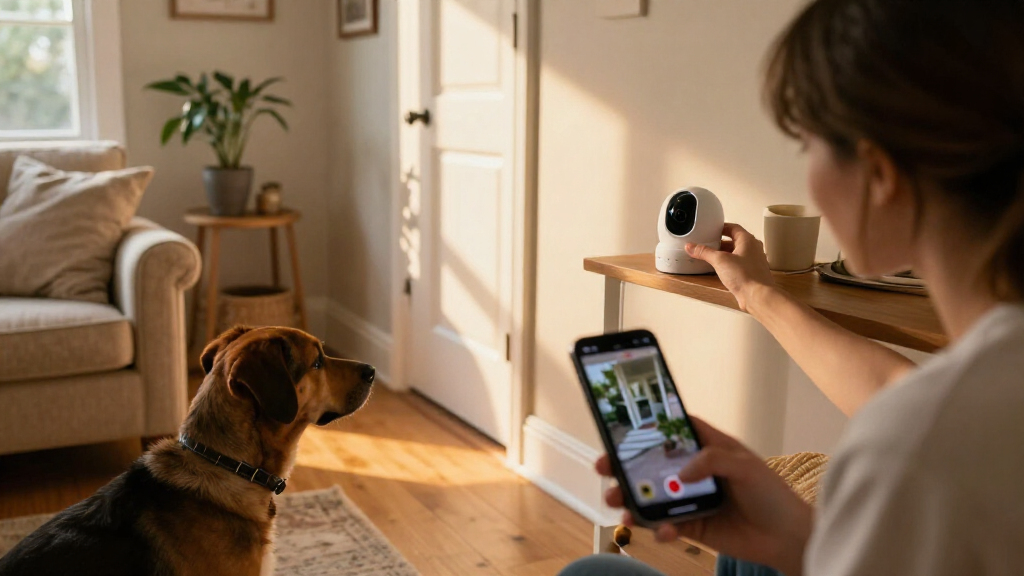
These cameras let people monitor a home, receive motion alerts, and review recordings from a phone or other connected device. They range from compact indoor models to weatherproof outdoor cameras, video doorbells, and systems connected to a local recorder. Your best fit depends on where you need coverage, how often you want recording, and how you feel about subscriptions and cloud storage.
This guide walks you through what cameras can and cannot do, how to compare the features that affect real footage, and what to check before installation. You’ll also find practical steps for improving alerts and protecting the privacy of people around your home.
Pick a camera for a specific location and event; a wide view can cover more ground while shrinking distant details.
Check retention time, continuous recording, subscription requirements, and outage behavior before choosing storage.
Test camera placement in daylight and darkness, then tune detection zones to reduce irrelevant alerts.
Protect camera accounts with unique passwords, multifactor authentication, current firmware, and controlled sharing.
Treat cameras as tools for awareness and evidence; pair them with appropriate locks, lighting, and response plans.
Know what a camera can actually do for your home
Smart home security cameras give you remote views, event notifications, and recordings, but they do not guarantee that an incident will stop or that help will arrive. Think of a camera as a window and a notebook: it can show you an event and preserve evidence, while a separate alarm, lock, or monitored service may serve a different purpose.
For example, a camera above the garage might alert you when someone walks up the driveway while you’re at work. You can check the clip and decide whether to call a neighbor or contact authorities. That camera has helped you notice and document activity; it has not physically stopped anyone from entering.
Some models recognize people, packages, or vehicles, which can make alerts more useful than a plain motion notice. Still, detection depends on placement and surroundings. A tree branch swaying across the frame, headlights sweeping over a wall, or a pet crossing a room may all trigger notifications depending on the camera and its settings.
Set a clear goal for each device before you buy it. A doorbell camera may help you see visitors, while a camera facing a side gate may help record movement after dark. In both cases, the camera adds information to your security plan; it does not replace strong locks, sensible lighting, or emergency services.
Products Worth Considering

Bose SoundTouch 10 Wi-Fi Speakers, 2-Pack, Black

Shark IY143H Cordless Pet Stick Vacuum

Levoit Vital 100S-P Air Purifier with Washable Pre-Filter
As an affiliate, we earn on qualifying purchases.
Compare the features that change the footage you get
Smart home security cameras differ most in coverage, recording, power, and detection; a larger resolution number does not settle every buying question. Look at the whole path from what enters the lens to what you can retrieve later. Distance, lighting, image compression, and lens quality all affect whether a recorded face has useful detail.
Imagine two cameras pointed across a long driveway. A wide lens on the first captures the driveway, lawn, and front walk in one frame, but a person near the street appears small. A narrower view on the second might give you more detail at the gate while leaving the walk outside its coverage.
| Feature | What it helps with | What to check |
|---|---|---|
| Resolution and lens | Capturing visible detail | Distance, lighting, view width, and compression |
| Night vision | Recording in dim conditions | Infrared or visible light, glare, and actual scene conditions |
| Detection | Filtering event notices | Person, package, or vehicle options and false alerts |
| Power and connection | Keeping the camera online | Charging, nearby power, Wi-Fi, hub, or wired network |
| Storage | Saving and finding footage | Retention time, continuous recording, fees, and outages |
Night vision deserves a practical check, too. Infrared often produces black-and-white footage, while visible lights can support color recording but may illuminate an area you would rather keep dark. An advertised night range does not guarantee useful identification at its far edge. If you’re monitoring a porch, test the camera from the porch to the path where visitors actually walk.
Choose a recording plan that fits your budget and internet
Camera recordings can go to cloud storage, local storage, or both, and each option changes how you access footage and what you keep paying for. Cloud plans may make remote playback straightforward, while a memory card or local recorder can reduce recurring fees. Check the details for the specific model before purchase, because some features may depend on a subscription.
Suppose your camera catches a delivery on Tuesday, but you don’t notice the alert until Friday. If the plan keeps clips for only a short period, that recording may already have disappeared. Check how long clips stay available, whether you can download them, and whether continuous recording is offered if you need more than event-triggered clips.
An internet outage can interrupt remote access or cloud uploads, while a power cut can turn off a camera unless it has backup power. Local recording may keep footage on the device or recorder during some internet interruptions, depending on the setup. That distinction matters if you live where the connection drops during storms: ask what happens when internet and power fail, separately.
Write down the full expected cost before choosing a system: cameras, any hub or recorder, storage plans, and replacement batteries. A lower-priced camera with a monthly fee can cost more over several years than a model with local storage. On the other hand, paying for cloud access may be worthwhile if you value remote retrieval and simple sharing after an event.
Place cameras for useful coverage and fewer false alerts
Smart home security cameras work best when they watch the specific approach or room you care about without collecting unnecessary views. Placement shapes image detail, motion detection, Wi-Fi reliability, and privacy at once. Before mounting a camera, test the angle from the intended spot and check whether walls, glass, bright lights, or moving branches create problems.
For example, a camera aimed through a living-room window may seem like an easy way to watch the driveway, but reflections and nighttime infrared glare can spoil the view. Mounting it outside may improve the picture, though an outdoor device must be rated for its location and installed according to the manufacturer’s instructions.
- Name the event you want to capture. Pick a door, path, package area, or room rather than trying to watch everything.
- Test the view at the right time of day. Check bright sun, shadows, headlights, and nighttime conditions from the camera’s actual position.
- Confirm the connection. Test Wi-Fi where the camera will sit; a weak signal can delay or interrupt clips and alerts.
- Adjust the detection area. Where available, exclude a busy street or swaying tree so alerts focus on the walkway or gate.
- Review the result. Walk through the monitored area and see whether the recording shows the detail and timing you need.
After installation, clean outdoor lenses when dust or rain marks blur the image, and check camera angles after strong wind or yard work. A five-minute review can catch a lens blocked by a newly grown shrub before you rely on the footage. If installation involves new electrical wiring, follow applicable safety steps and use a licensed professional for electrical work.
Protect privacy without losing the view you need
Smart home security cameras can record household members, visitors, neighbors, and parts of public spaces, so privacy controls should shape the setup from the start. Use a unique account password, multifactor authentication, current firmware, and careful sharing permissions. These steps help protect access to the account that holds your live views and recordings.
A camera inside a shared kitchen may be useful while you’re away, but it can also record family conversations and ordinary routines. A privacy shutter, schedule, or activity zone can limit when and where that camera operates. For a front camera, a privacy mask may hide a neighbor’s window while leaving your own gate in view.
Check local rules before recording audio or aiming a camera beyond your property. Rules vary by location, and recording conversations can raise different legal concerns from capturing video of your own entrance. If you’re unsure, narrow the view and disable audio until you have checked the rules that apply where you live.
A useful privacy test: If you would be uncomfortable explaining why a camera records a particular area, adjust the angle, schedule, or recording setting.
Household access also deserves a quick review. Give each person their own account if the system supports it, remove access when a guest no longer needs it, and check which devices can show the feed aloud or on a shared display. A camera should make your home easier to manage, not quietly turn every room into a public screen.
Keep alerts and recordings useful after installation
A working camera needs periodic checks because batteries, connections, software, and storage limits can all affect whether it captures an event. Battery models are easier to place, but they may record less often to conserve power and need charging. Wired models avoid battery swaps, though installation and power access can make them harder to place.
Say your side gate camera sends fewer alerts after a cold week. Check the battery, connection, detection settings, and recent clips rather than assuming the camera still covers the gate as before. A brief walk past the camera can confirm that it records and that the notification reaches your phone.
Use a simple monthly check: open the live view, review one recent clip, confirm that storage is available, and look for firmware updates. If alerts become noisy, narrow the detection zone or adjust sensitivity, then observe it for a few days. Heavy filtering can also hide events you care about, so test changes against normal activity around your home.
Smart-home integrations can make a camera easier to use on a phone, display, alarm, or voice assistant, but support varies by model and feature. Standards such as Matter have advanced cross-brand smart-home connections, while camera support and available controls can still differ. Before buying, confirm that the exact live view, alerts, and recording controls you want work with your existing devices.
Frequently Asked Questions
Do smart security cameras need Wi-Fi or internet?
Many cameras use Wi-Fi to send alerts and provide remote access, but some systems connect to a hub or wired network. What happens without internet depends on the model and storage setup, so check whether it can record locally during an outage.
Can a camera record without a subscription?
Some cameras offer local recording on a memory card or recorder, while others require a subscription for certain recordings or features. Check the exact model’s storage and feature terms before you buy.
How accurate are person and package alerts?
Specific detection can cut down on irrelevant motion notices, but results vary with placement, settings, and the scene. A tree, pet, headlight, or passing car may still trigger alerts, so test the camera and adjust its detection area.
Does 4K guarantee that I can identify a face?
No. Lens quality, distance, lighting, camera angle, and compression all affect detail, and a wide view can make a person appear small. Test the camera at the distance where you expect to identify a visitor.
Can I point a camera toward a neighbor’s property?
Privacy and recording rules vary by location, especially for audio and areas beyond your property. Aim the camera at your own entrance or walkway, use privacy zones where available, and check local rules if you are unsure.
Can cameras prevent a break-in or call emergency services?
A camera can send an alert or preserve evidence, but it does not guarantee prevention or a response. Some systems offer monitoring or alarm integrations; verify those services and their terms separately from the camera’s recording features.
Conclusion
Choose a camera for the view you need, the recordings you can retrieve, and the privacy boundaries you want to keep. Then test it at the gate, porch, or room it will actually watch; the footage should answer a practical question, not just look impressive in a product listing.
A good setup quietly does its job: it catches the parcel on the step, ignores the maple leaves in the wind, and leaves the neighbor’s window out of frame.