
This checklist is for anyone comparing smart cleaning appliances for the home, from floor care to pet feeding and lawn maintenance. It helps you consider how each type of product fits the spaces, routines, and household needs you already have.

Get home appliances delivered free with Prime
- Fast, free delivery on millions of items
- Prime Video, Amazon Music and more included
- Member-only deals all year
The sections are organized by appliance type, with one named pick in each slot. Each includes buying considerations, a short list of features or details to check, and a concise take on who may find the pick suitable.
Before choosing, measure relevant spaces and check compatibility and fit against your home and routine. Use the look-for points to compare product details, then decide which appliance addresses your most important need first.
Robot Vacuum
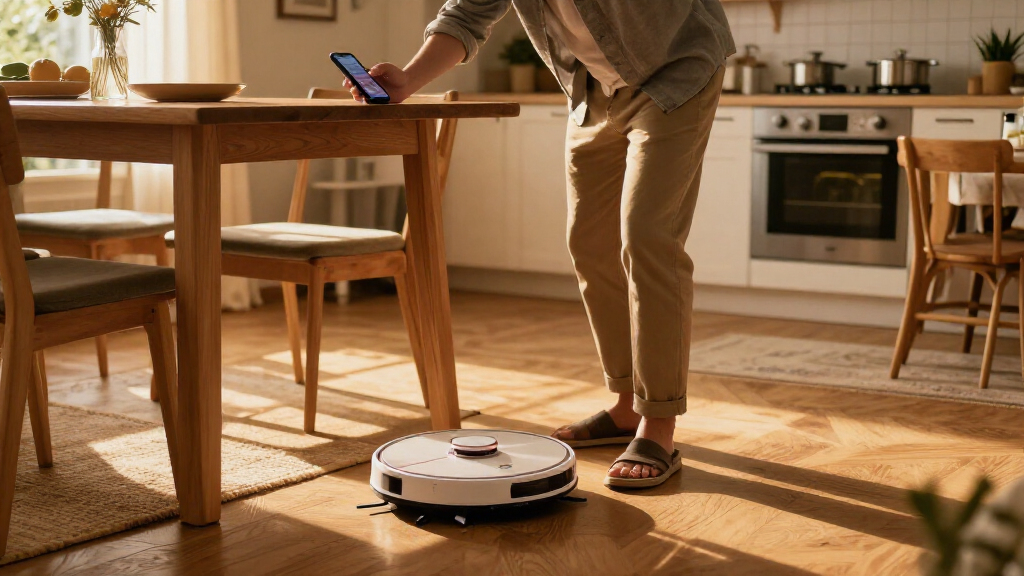
A robot vacuum can help with routine floor care, so the right choice depends on the surfaces and obstacles in the rooms you want it to cover. Before buying the Roborock Saros 20 Flow Robot Vacuum and Mop, check the product details for the floor types it supports, how its vacuuming and mopping functions work, and what setup the docking area requires.
A common mistake is treating a robot vacuum as a fit-and-forget appliance. Check whether its dimensions suit the routes between furniture, whether thresholds or rugs could affect movement, and whether the areas you want cleaned can be reached without moving household items. For a model that also mops, review any instructions for preparing floors and maintaining mop components. Confirm that the dock has a suitable location with the required clearance and access to power. Consider your home’s layout and whether you are comfortable with the maintenance and setup described by the manufacturer. Room layout, floor compatibility, and dock placement are practical checks to make before deciding.
What to look for:
- Confirm compatibility with your floor types and rugs.
- Check the robot and dock dimensions against available space.
- Review how the mopping function is set up and maintained.
- Consider thresholds, furniture, and routes between rooms.
- Read the manufacturer’s guidance for routine care.
Roborock Saros 20 Flow Robot Vacuum and Mop

This robot vacuum and mop uses 36,000 Pa suction, a self-cleaning roller mop, and AI floor recognition to clean hard floors and carpets. It can cross double-layer thresholds up to 3.46 inches, recognize more than 300 types of obstacles, and return to its dock for hot-water mop washing and warm-air drying.
Pros:
- Combines vacuuming and mopping with a self-cleaning roller mop.
- AI floor recognition adjusts water flow, and the mop lifts to help protect carpets.
- Dock washes the mop with hot water, dries it with warm air, and dispenses detergent automatically.
- Recognizes over 300 obstacle types and can cross thresholds up to 3.46 inches.
Cons:
- Supports 2.4 GHz Wi-Fi only.
- The 66.6 dB noise level may be noticeable during cleaning.
Best for: Households considering combined robot vacuuming and mopping
Not ideal for: Homes where floor types or thresholds are incompatible
Bottom line: Check floor compatibility, route access, and dock placement before choosing the Roborock Saros 20 Flow Robot Vacuum and Mop.
Cordless Stick Vacuum
A cordless stick vacuum is a practical slot to consider when you want a readily available floor-care tool for cleaning sessions around the home. With the Dyson Cyclone V10 Origin Cordless Vacuum, check the included configuration and product guidance to understand what tasks it is designed to handle and what attachments come with the model.
One common buying mistake is assuming every stick vacuum suits every surface or cleaning routine. Review the manufacturer’s stated floor compatibility, available accessories, and instructions for switching between tasks. Think about where the vacuum will be stored and whether its dimensions and charging setup work in that location. If you expect to use it for stairs, furniture, or other above-floor areas, confirm that the product details support those uses and identify which attachments are included or sold separately. Check the care instructions too, so you know how to maintain the parts that collect dust. Included tools, storage, and charging access can make the difference between a convenient fit and an awkward one.
What to look for:
- Check which attachments are included with this model.
- Confirm the stated floor types and intended uses.
- Measure storage space and review the charging setup.
- Look for instructions on switching between cleaning tasks.
- Review maintenance guidance for dust-collection components.
Dyson Cyclone V10 Origin Cordless Vacuum

The Dyson Cyclone V10 Origin offers powerful, fade‑free suction for up to 60 minutes of cordless cleaning. Its Motorbar™ cleaner head de‑tangles long hair and pet fur while whole‑machine filtration captures 99.99% of particles as small as 0.3 microns.
Pros:
- Powerful suction with up to 60 minutes of fade‑free runtime.
- Motorbar™ de‑tangling head removes long hair and pet fur from carpets and hard floors.
- Whole‑machine filtration captures 99.99% of particles as small as 0.3 µm, expelling cleaner air.
- Cordless design converts to a handheld vacuum for cars, stairs, upholstery, and tight spaces.
Cons:
- Weight of 5.2 lbs may be tiring for extended use.
- Battery runtime varies by power mode and can be limited on higher settings.
Best for: People looking for a cordless stick vacuum
Not ideal for: Shoppers who need attachments not included with the model
Bottom line: Review the included tools, floor guidance, and storage needs for the Dyson Cyclone V10 Origin Cordless Vacuum.
Robot Window Cleaner
A robot window cleaner is a specialized option for glass-cleaning routines. Before choosing the ECOVACS WINBOT W3 OMNI Robot Window Cleaner with Self-Cleaning Station, check the manufacturer’s instructions for the glass types, window shapes, and cleaning conditions it supports. Confirm how the self-cleaning station is intended to be used and maintained.
A frequent mistake is buying for the idea of effortless window cleaning without checking the windows themselves. Identify the panes you want to clean and review product guidance for frame depth, glass access, surface condition, and any limits around window placement. Look at how the cleaner is attached, operated, and retrieved, and make sure those steps suit the windows in your home. Consider whether the station has an appropriate place to sit and whether its setup fits your available space. For windows that open onto difficult-to-reach areas, read safety and operating instructions closely before use. Window compatibility and safe access should guide the decision more than the appliance category alone.
What to look for:
- Check supported glass types and window configurations.
- Review frame and surface requirements in the manual.
- Understand attachment, operation, and retrieval steps.
- Confirm the station fits the available storage area.
- Follow the manufacturer’s safety guidance for window access.
ECOVACS WINBOT W3 OMNI Robot Window Cleaner with Self-Cleaning Station

The ECOVACS WINBOT W3 OMNI cleans glass with a triple-nozzle spray system, a wet wiping pad, and Win-SLAM 5.0 navigation with obstacle avoidance. Its station automatically washes the pads, while TruEdge technology helps clean window edges and corners.
Pros:
- Automatically washes cleaning pads after use.
- Triple-nozzle spray helps loosen dirt across glass surfaces.
- TruEdge scrubber is designed to clean edges and corners.
- App-controlled modes accommodate different window layouts and cleaning needs.
Cons:
- Designed for glass surfaces.
- Requires a battery-powered setup and app control.
Best for: Households whose windows match the stated requirements
Not ideal for: Windows outside the supported configurations
Bottom line: Verify your window type, operating access, and station setup before selecting the ECOVACS WINBOT W3 OMNI Robot Window Cleaner with Self-Cleaning Station.
Smart Air Purifier
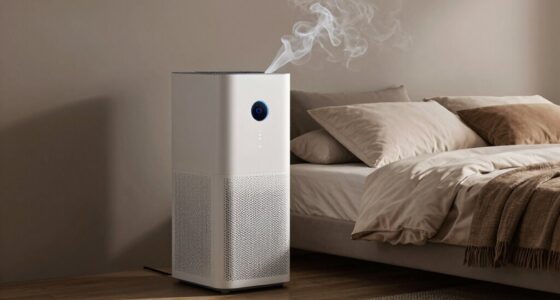
An air purifier is a room-specific appliance, so matching its stated coverage to your intended space is a key first step. The Levoit Core 600S-P Smart Air Purifier is described as suitable for large rooms up to 2933 ft²; check the product documentation to understand how that stated coverage applies to your room and usage. Room size and placement deserve attention before purchase.
A common mistake is choosing by a coverage figure alone. Check the dimensions of the room you plan to use it in and review the manufacturer’s explanation of coverage, operation, and recommended placement. Consider whether the appliance can sit in a location that follows its clearance guidance without obstructing everyday movement. For a smart model, look at the setup requirements and confirm that the controls or connected features suit the way you want to manage it. Review filter information, including which replacement parts are specified and how maintenance is handled. These details help you plan for ongoing use and determine whether the product fits your room and routine. Placement, controls, and filter upkeep are useful comparison points alongside the stated room coverage.
What to look for:
- Compare the room’s dimensions with the stated coverage.
- Read how the manufacturer defines and qualifies coverage.
- Check placement and clearance instructions.
- Review smart setup and control requirements.
- Confirm filter type and maintenance guidance.
Levoit Core 600S-P Smart Air Purifier for Large Rooms up to 2933 ft²

The Levoit Core 600S-P is an AHAM‑verified smart air purifier designed for extra‑large spaces, delivering a CADR of 391 CFM and covering up to 2,933 ft². It features a three‑stage filtration system that captures 99.97% of particles as small as 0.1 µm and includes an auto mode that adjusts fan speed based on real‑time air quality.
Pros:
- AHAM‑verified performance ensures reliable air cleaning and energy efficiency.
- Covers extra‑large rooms up to 2933 ft² with a high CADR of 391 CFM.
- Three‑stage filtration captures 99.97% of fine particles, allergens, and odors.
- Auto mode continuously monitors air quality and adjusts fan speed for optimal performance.
Cons:
- Large footprint may be oversized for smaller spaces.
- Replacement filters can add ongoing maintenance cost.
Best for: Shoppers comparing a purifier for a large room
Not ideal for: Rooms where recommended placement or coverage does not fit
Bottom line: Match your room and placement options to the stated coverage and maintenance guidance for the Levoit Core 600S-P Smart Air Purifier.
Automatic Pet Feeder
An automatic pet feeder can be useful for planning a consistent feeding routine, but its fit depends on your pet and the way you manage meals. The PETLIBRO Automatic Pet Feeder with 1080p Camera, Night Vision, and Dua is listed with a camera and night vision; check the full product listing to confirm the exact features, feeder capacity, and setup requirements before choosing.
A common mistake is assuming that a camera or automation alone makes a feeder suitable for every pet. Review the manufacturer’s instructions for portion settings, food type, capacity, and cleaning. Consider whether the feeder’s placement works for your pet and whether its power and connectivity requirements suit your home. If you plan to use camera features, check how viewing and setup are handled and whether the listed functions meet your needs. Also consider how the feeder fits into your existing feeding routine and what you would do when it needs refilling or maintenance. Food compatibility, capacity, and daily care are central checks; use the complete product details to clarify the truncated “Dua” wording in the supplied name.
What to look for:
- Confirm the complete feature list and exact product name.
- Check food compatibility and portion-setting instructions.
- Compare feeder capacity with your pet’s routine.
- Review power, connectivity, and camera setup requirements.
- Check cleaning, refill, and maintenance guidance.
PETLIBRO Automatic Pet Feeder with 1080p Camera, Night Vision, and Dual Bowls, 5

Control scheduled feedings for up to two pets through the PETLIBRO app, with up to six meals per day and 1–50 portions per meal. The feeder includes a 1080p camera with a 145° viewing angle and night vision, two-way audio, and alerts for movement, low food, blockages, Wi-Fi issues, and malfunctions.
Pros:
- Supports scheduled feeding for up to two pets with adjustable meal portions.
- 1080p camera offers a wide 145° view and infrared night vision.
- Two-way audio and a customizable mealtime call help owners interact with pets remotely.
- Includes two stainless steel bowls and alerts for low food and feeding issues.
Cons:
- Cloud storage is optional rather than included.
- The feeder is intended for indoor use and requires a corded power source.
Best for: Pet owners comparing an automatic feeder with a camera
Not ideal for: Households whose food or setup needs are unsupported
Bottom line: Confirm the full feature list, food compatibility, and setup requirements for the PETLIBRO Automatic Pet Feeder with 1080p Camera, Night Vision, and Dua.
Smart Lawn Mower
A robot lawn mower is a substantial addition to an outdoor routine, so start by checking whether the YARBO Y40 Core Robot Lawn Mower Pro matches your property and the manufacturer’s stated operating requirements. Yard compatibility is the first consideration: review the product documentation for supported lawn layouts, boundaries, slopes, and setup.
A common mistake is choosing a mower based only on the promise of automation. Walk the areas you want maintained and compare their layout with the installation and operating instructions. Check how boundaries are defined, what obstacles or surface conditions the mower can handle, and whether the required setup fits your yard. Consider where the unit will be stored or charged and how it will be maintained between uses. If your lawn includes separated areas, narrow passages, or uneven sections, look for explicit guidance on those conditions in the product details rather than assuming they are supported. Yard layout, boundary setup, and storage are practical points to resolve before purchasing.
What to look for:
- Check the stated lawn-area and layout requirements.
- Review boundary and installation instructions.
- Confirm guidance for slopes, obstacles, and narrow passages.
- Plan a suitable storage and charging location.
- Read the recommended maintenance steps.
YARBO Y40 Core Robot Lawn Mower Pro

The wire-free robotic mower uses dual 300W motors and two blade options to cut thick or damp grass, with an adjustable cutting height of 0.8–4.0 inches. RTK-GPS, binocular vision and multi-sensor navigation support precise mowing and obstacle avoidance, while tracked wheels handle uneven terrain and slopes up to 70% (35°).
Pros:
- Two blade options for different grass types and conditions
- Grass ejection design helps prevent clipping buildup and reduce cleaning stops
- Navigation sensors support precise positioning and obstacle avoidance
- Tracked design supports mowing on uneven, muddy and stony terrain
Cons:
- Approximately 210 lbs; two adults are recommended for assembly
- Installation requires a 120° unobstructed view of the sky for the Data Center Set
- Remote control is sold separately
Best for: Shoppers whose lawn matches the mower’s requirements
Not ideal for: Yards with unsupported layouts or surface conditions
Bottom line: Compare your lawn and installation needs with the manufacturer’s guidance before choosing the YARBO Y40 Core Robot Lawn Mower Pro.
If you are prioritizing spending, start with the appliance that addresses the most frequent or difficult chore in your home. Compare the fit and setup requirements for that category first, then consider other appliances after checking their room, floor, window, pet, or yard compatibility.
Use the product manuals and complete listings to resolve details that matter to your household, especially configuration and maintenance. With a little careful matching, this checklist can help you build a home-care routine around appliances that suit your spaces and everyday needs.
Black Friday Picks

Sonos One (Gen 2) Two-Room Set Voice-Controlled Smart Speaker with Alexa (2-Pack, Black)
As an affiliate, we earn on qualifying purchases.