
TL;DR

Get home appliances delivered free with Prime
- Fast, free delivery on millions of items
- Prime Video, Amazon Music and more included
- Member-only deals all year
Smart home security cameras can record activity and send alerts, but they do not replace an alarm system and depend on reliable power, Wi-Fi, and account security. Choose by coverage, night performance, detection accuracy, storage costs, and privacy controls—not resolution alone. Before buying, map the area you want to monitor and check the full cost and compatibility of the exact model.
A 4K camera can still give you a useless recording if it points into a porch light, loses Wi-Fi, or watches the wrong corner of your driveway. Smart home security cameras are only as helpful as the view, connection, and storage behind them.
This guide helps you match a camera to the area you want to monitor, compare image quality and field of view, and understand the tradeoffs between battery power, wired power, cloud storage, and local recording. You’ll also get practical steps for placement and account security, so a new camera adds useful awareness without turning your home into a source of constant alerts or unwanted recording.
Think of a camera as a lookout, not a guard: it can show you what happened, but it cannot physically stop an intruder, and it may fail when power, internet, or account access fails. The right choice starts with one concrete question: what do you need to see, and what will you do with the footage?
Choose the camera around the event and distance you need to capture; resolution alone cannot guarantee identifiable footage.
Test Wi-Fi, lighting, power, and the camera angle at the exact installation point before you mount it.
Compare cloud plans, local storage, retention periods, and paid detection features against the total cost over several years.
Use activity zones and careful framing to reduce false alerts and avoid recording spaces where people expect privacy.
Protect camera accounts with unique passwords, multifactor authentication, software updates, and limited sharing.
Choose a camera by the view you need, not the resolution on the box
Smart home security cameras work best when their view matches a specific job: watching a front door, checking a nursery, or covering a driveway. Resolution helps, but lighting, distance, lens quality, movement, and camera angle also decide whether footage shows an identifiable detail. A camera aimed at a doorbell from a few feet away has a different task from one trying to capture a face across a dark yard.
Field of view describes how much area the lens can capture. A wide view can cover more of a small room or porch, but it makes distant people and objects appear smaller. For example, one wide-angle camera at a garage corner may show both the side door and a parked car, while a narrower view aimed at the side door may capture clearer detail at that entrance.
Night performance deserves its own test. Infrared night vision can make a dark walkway look like a crisp black-and-white scene, but headlights, glass reflections, or a nearby wall can wash out the picture. Before you choose, check independent tests when available, and ask whether the important spot—such as a face-height approach to the door—is visible after dark.
- For a broad overview: favor a wider lens and useful motion zones.
- For identifying close activity: favor a clear, well-lit angle with less distance.
- For long driveways: check test footage at the far end; resolution alone does not promise readable plates.
In other words, judge a camera by the evidence it captures in your actual setting, not the biggest number printed on the packaging.
4K outdoor security camera with night vision
As an affiliate, we earn on qualifying purchases.
As an affiliate, we earn on qualifying purchases.
Match power, weather protection, and Wi-Fi to the camera’s location
Smart home security cameras need dependable power and network access to deliver reliable monitoring. Battery models are easier to mount because you don’t need a nearby outlet, while wired models avoid regular charging and often suit a fixed location. Neither choice solves weak Wi-Fi: a camera at the far end of a garage can miss uploads or respond slowly if your signal fades there.
Think through the spot before you buy. A renter who wants to monitor a front door may prefer a battery camera that installs without permanent changes; a homeowner covering a busy back entrance may prefer steady wired power. Battery life varies with settings and activity, so a camera facing a windy tree or busy sidewalk may wake more often and need charging sooner. Solar accessories can help, but they need suitable sunlight and placement, not just a sunny product photo.
Outdoor cameras also need to suit local weather and temperature swings. Check the manufacturer’s stated operating conditions and weather resistance for the exact model. A covered porch and an exposed coastal wall are not the same installation: wind-driven rain, hot afternoon sun, and freezing nights can test a camera differently.
Test your Wi-Fi at the exact mounting point before you commit. If the phone drops to one bar beside the planned camera, move the router, add a compatible access point, or choose another location. The complete setup includes the router and power supply, not just the camera. For a wired installation that involves electrical work, use a licensed professional; turn off power where required and use appropriate PPE rather than improvising around live wiring.
wireless home security camera system
As an affiliate, we earn on qualifying purchases.
As an affiliate, we earn on qualifying purchases.
Compare storage and subscriptions before the checkout page
Smart home security cameras store recordings in different places, and each option changes your cost, control, and recovery options. Cloud plans can keep footage available even if someone steals or damages a camera, while a memory card or home hub may avoid a recurring fee. The tradeoff is that a local recorder can be stolen, damaged, or fail along with the camera.
Compare the exact model’s free features with its paid plan. Some subscriptions add longer video history, richer detection, or event downloads; other cameras offer useful local recording without a monthly bill. Plan terms can change, so check the current manufacturer details before you buy. A low-cost camera can become an expensive choice if you need several subscriptions to keep the features you expected.
| Storage choice | What it can offer | What to check |
|---|---|---|
| Cloud | Remote access and footage that may survive camera theft | Monthly or annual price, history length, and plan limits |
| Memory card | Local recording without a cloud plan on some models | Supported card size, overwrite settings, and theft risk |
| Home hub | Local storage shared by compatible cameras | Hub cost, compatibility, and protection from damage |
Calculate the total over the time you expect to use the camera. For example, compare a camera plus three years of subscription fees against a local-storage model plus a hub. Also check how long footage stays available and whether the camera records continuously or only around detected events. Storage that overwrites old clips quickly may not help if you discover an event several days later.
Cloud and local recording are not automatic guarantees of privacy or safety. Review encryption information, retention controls, account access, and what happens when the internet goes down. Choose the storage arrangement you can keep secure and afford, not just the one that sounds easiest in an ad.
battery-powered security camera with local storage
As an affiliate, we earn on qualifying purchases.
As an affiliate, we earn on qualifying purchases.
Set alerts that tell you something useful instead of crying wolf
Smart home security cameras use motion and, on some models, software to label activity as a person, pet, vehicle, or package. These features can reduce irrelevant notifications, but detection is not proof that the camera understood an event correctly. Performance changes with camera angle, light, weather, software, and what crosses the frame.
Take a driveway facing a leafy tree. On a windy day, basic motion alerts may buzz every few minutes as branches sway; person detection can cut down the noise, but it may still miss someone walking behind a parked car. A busy household can run into the same problem indoors: a pet crossing the hallway may trigger alerts even when you only care about the front door.
Use activity zones, sensitivity settings, and detection categories where the camera offers them. Aim the frame away from public sidewalks or a neighbor’s window when you can, then walk through the area yourself and see which alerts arrive. A useful camera should make the phone notification feel like a clear tap on the shoulder, not a smoke alarm that sounds all day.
An alert is a prompt to check footage, not a verdict. Confirm what happened before you act on a camera’s label.
Some newer cameras process selected events on the device, which can reduce reliance on cloud processing, but exact capabilities vary by model. Ask which features work locally, which require an internet connection, and which require a subscription. If you rely on a camera for a specific event—like a package left beside the door—test that scenario in daytime and at night rather than trusting a feature name.
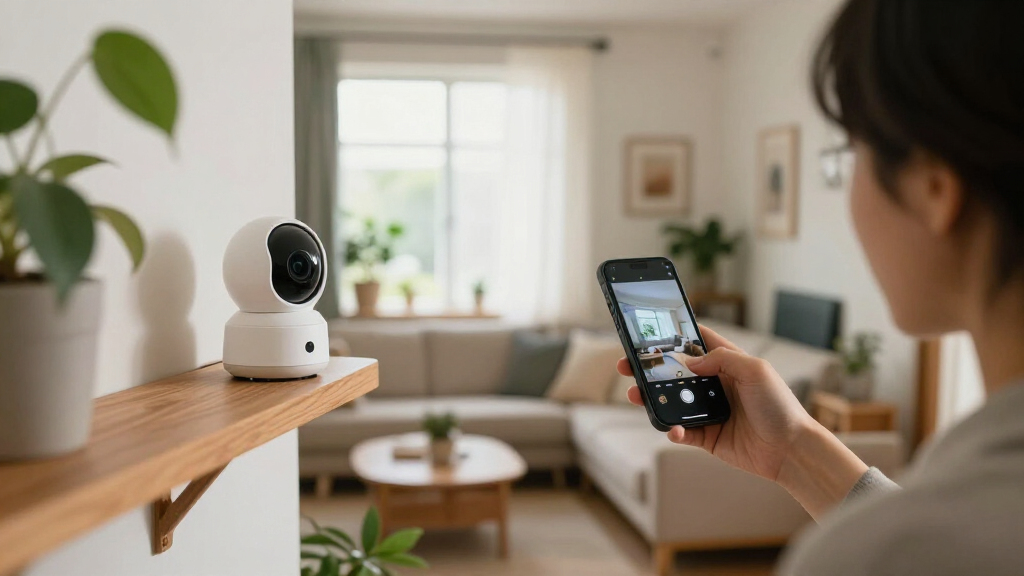
smart home security camera with activity zones
As an affiliate, we earn on qualifying purchases.
As an affiliate, we earn on qualifying purchases.
Protect privacy with careful placement and stronger account settings
Smart home security cameras record potentially sensitive video, and some models also capture audio, so privacy depends on both setup and account security. Aim the camera at your own entrance or yard rather than through a neighbor’s window or across a shared space. Indoors, think about who uses the room: a camera that makes sense in an entryway may feel invasive in a bedroom or a guest’s private space.
Local laws vary, especially for audio recording and cameras that cover shared areas. Check the rules that apply where you live before recording conversations or common spaces, and tell household members and guests what the camera records. If you rent or live in a multi-unit building, review lease terms and building rules before mounting a device in a hallway or other shared area.
Secure the account like you would the front door. Set a unique password, turn on multifactor authentication, install software updates, and limit video access to people who need it. Review shared-user permissions when a guest, former roommate, or installer no longer needs access. If the camera offers a privacy shutter, recording schedule, or audio switch, learn where those controls live before you need them.
For example, you might schedule an indoor camera to pause when your family is home and activate it while everyone is out. Activity zones can keep a street-facing window from filling your history with passing cars. Ask the vendor how long clips remain stored, whether deletion removes them from backups, and whether particular detection features send video to cloud services. Convenience matters, but so does knowing who can see the footage and when.
Use a simple five-step check before you mount the camera
Smart home security cameras are easier to trust when you test the whole setup before calling the job done. A camera mounted in the perfect spot can still disappoint if it misses the doorway at night, drops its connection, or sends alerts for every passing car. Take a few minutes to check the view, network, storage, and privacy settings while you can still adjust them.
- Name the event you care about. For example, decide whether you need to see a visitor’s face, check a package, or monitor a side gate.
- Choose a mounting angle. Aim at the approach rather than a bright window or headlight, and avoid unnecessary views into neighboring private areas.
- Test power and connection. Confirm the camera stays online at the planned location and that battery or wired power suits how often it will record.
- Review recording and alerts. Check local versus cloud storage, clip history, activity zones, and what features require a subscription.
- Run a real-world trial. Walk through the scene in daylight and after dark, then adjust the angle and alert settings.
Say you mount a camera over a porch to catch deliveries. Ask someone to approach from the sidewalk carrying a box, then review the clip: can you see the person, the package, and the place they left it? Repeat after sunset. If the porch light turns the person into a shadow, adjust the angle or lighting rather than assuming a higher-resolution model will fix everything.
Smart displays, voice assistants, and routines can add convenience, but compatibility labels do not promise every feature works across platforms. Check the exact camera, hub, and feature combination. A camera feed appearing on a screen is useful; receiving every alert or controlling every privacy setting through that screen may not be supported.
Treat a camera as one useful layer, not the whole security plan
Smart home security cameras can document activity and give you remote awareness, but they are not a complete security system. They depend on power, network service, working software, and account access, and a notification cannot physically stop someone from entering. Think of the camera as one lookout on a team that may also include good lighting, solid locks, and an alarm suited to your needs.
Consider a family that receives a motion alert while away. They can check the live view or saved clip, but if the router has lost power or the camera battery is empty, the feed may not be available. A recorded event can help explain what happened afterward; it is not the same thing as a monitored alarm or a guaranteed emergency response.
Reliability comes from the whole arrangement. Keep the router updated, make sure camera software still receives support, and know what continues working during an internet outage. Some models can record locally when the internet fails, while remote alerts and live viewing may stop; the behavior differs by device. Check the manufacturer’s instructions rather than assuming every camera handles outages the same way.
For a modest setup, a front-door camera paired with a bright porch light and a strong deadbolt may address more practical concerns than a high-resolution camera pointed at an empty driveway. If you need alarm monitoring, emergency response, or coverage across several entrances, compare those needs with dedicated security equipment and professional advice. Use video to improve awareness, not to promise protection it cannot provide.
Frequently Asked Questions
Do smart home security cameras need Wi-Fi?
Many cameras use Wi-Fi for live viewing, alerts, and cloud storage. Some can record to a memory card or hub without internet, but remote access and notifications may stop when the connection fails. Check the exact model’s offline features before buying.
Can I use a smart security camera without a subscription?
Yes, some cameras offer local recording to a memory card or home hub without a monthly plan. Free features vary: a subscription may be required for longer video history, advanced detection, or clip downloads. Compare the current plan details for the exact model.
Are local-storage cameras more private than cloud cameras?
Local storage can give you more direct control over where footage sits and may reduce cloud processing, but it is not automatically safer. A stolen device, damaged hub, weak account security, or insecure network can still expose or destroy recordings. Check access controls, encryption information, and backup options.
Can a camera identify faces or license plates?
Some cameras offer face or plate recognition features, but results depend on distance, angle, lighting, movement, and software. A wide view may show a whole driveway while making a plate too small to read. Test footage from the exact location and do not assume a resolution label guarantees identification.
How can I make my camera account harder to hack?
Use a unique password, turn on multifactor authentication, install updates, and remove old shared users. Review account sign-in and privacy settings regularly, especially after changing household members or handing out temporary access. These steps reduce risk, though no connected device is risk-free.
Conclusion
Choose a camera by the view you need, the connection and power your home can support, and the storage terms you are comfortable with. Then test it in the actual spot, in daylight and after dark, before relying on its alerts.
A camera is a lookout, not a lock: give it a clear view, protect its account, and pair it with the practical security steps that keep your home safer.
NFL season / tailgating Picks
team gear
As an affiliate, we earn on qualifying purchases.