TL;DR

Get home appliances delivered free — and shop member deals
- Fast, free delivery on millions of items
- Access to Prime Big Deal Days deals on October 6–7
- Prime Video, Amazon Music and more included
Smart home security cameras combine video with motion alerts, storage, and sometimes smart-home automation, but useful protection depends on placement, reliable power and Wi-Fi, and clear recording terms. Before buying, compare what happens during an internet outage, whether useful clips require a subscription, how the camera protects your privacy, and the full cost over time.
Your phone buzzes while you’re at work: a delivery has landed on the porch, but the video shows only a blur and half a cardboard box. A camera was watching. It just wasn’t watching well.
Smart home security cameras have shifted from simple recording devices to connected sensors that combine live video, motion alerts, storage, and sometimes home automation. That can help you check a front step or see what the dog is barking at, but features on a product box don’t tell you whether the camera will work in your actual home.
This guide helps you match camera type, video coverage, storage, connectivity, privacy, and ongoing cost to the job you need done. You’ll learn what to check before buying, how to avoid common setup mistakes, and why a practical camera that records reliably can beat a flashier model.
Choose an indoor, outdoor, or doorbell camera based on the area and event you need to monitor.
Judge footage by placement, lighting, field of view, and connection quality as well as resolution.
Check subscription terms, clip retention, and internet-outage behavior before choosing cloud or local storage.
Test motion zones at different times of day so useful alerts don’t drown in false alarms.
Use a unique password, multi-factor authentication, careful camera placement, and clear household privacy rules.
Choose the camera style that fits the place you need to watch
Smart home security cameras come in indoor, outdoor, and doorbell styles, and each works best where its shape, power source, and weather rating match the job. An indoor camera can keep an eye on a pet or living room; an outdoor model needs weather protection; a doorbell camera focuses on visitors and deliveries. Start with the location, not the feature list, because each form factor creates different limits on view, installation, and daily use.
For example, if packages disappear from your porch, a doorbell camera can capture visitors approaching the door. Its position near the entrance may show faces and deliveries well, but it may not cover a long driveway or a side gate. If you want to see whether your dog is chewing a cushion, an indoor camera placed on a shelf may give you a wider view. These are different problems, so buying the same camera for both could leave blind spots or expose rooms you don’t need to record. Matching the camera to the job also helps you avoid paying for features that won’t solve the problem.
Power changes the everyday experience and the chance that the camera is ready when needed. A battery-powered camera is easier to mount where there’s no outlet, but cold weather and frequent recording can mean more charging. A low battery may also lead you to postpone recharging, leaving a gap in coverage. A wired model avoids recharging, yet may require suitable existing wiring or professional installation; its reliability depends on that power source remaining available. Solar accessories can extend battery life when the camera gets enough sun, but cloudy weather and shaded eaves affect performance, so they may reduce charging chores rather than eliminate them.
Think of the camera as a porch light with a memory: it needs a clear view, dependable power, and a useful angle. Before mounting, stand where the lens will go and check what it sees at the height and direction you plan to use. Consider both what you want in frame and what you don’t want recorded. Keep it aimed at your property rather than into a neighbor’s window, and check local rules before recording audio or shared spaces. A good location balances useful coverage with practical installation and respect for privacy.
outdoor smart security camera with weatherproofing
As an affiliate, we earn on qualifying purchases.
As an affiliate, we earn on qualifying purchases.
Get footage you can actually use, not just a big resolution number
Useful footage depends on more than resolution: field of view, lens angle, lighting, motion blur, placement, and Wi-Fi all affect what a camera records. Higher resolution can reveal more detail when conditions are good, but it cannot rescue a face that appears tiny, dark, or smeared across the frame. Treat the camera like a pair of glasses: sharper lenses help only if they point in the right direction.
Imagine a person approaching your gate after sunset. A camera mounted high under the roof may capture the top of a hat, while a lower camera near the entrance could show a clearer face. If the lens covers a very wide area, the whole yard may appear in the shot, but a person at the far edge will take up fewer pixels. The tradeoff is between seeing more of the property and preserving enough detail in the part of the image that matters. The right placement balances coverage and detail.
Low-light performance matters when your porch is lit by a dim amber bulb or a streetlight across the road. Night vision, color night mode, and built-in lights work differently, so look for sample footage from similar lighting rather than relying only on a specification. Color modes may show more context, but they can depend on extra light; infrared night vision can work in darkness, though it may show less color detail. Rain, headlights, tree branches, and passing cars can also trigger motion or wash out a nighttime image. Those conditions matter because a camera that looks clear in a bright product demo may behave quite differently at the time an event occurs.
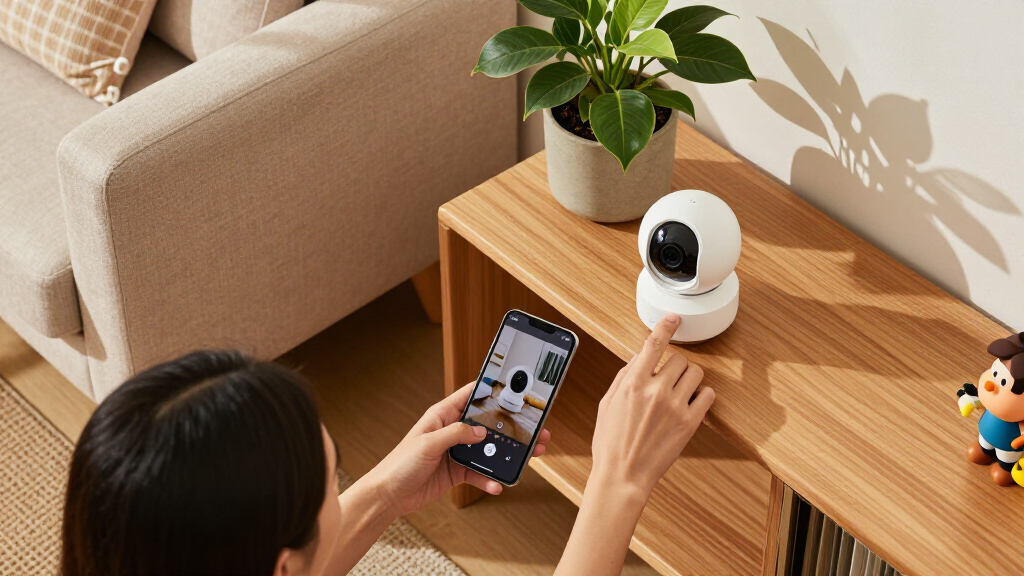
Before you settle on a mounting spot, test the live view from the places you actually care about: the path, the doorstep, or the garage entrance. Check whether the camera catches faces as people approach, not just as they walk away, and whether movement remains clear rather than blurred. If the live view stutters, recordings and alerts may also be delayed or incomplete, depending on the model and connection. Resolution is one part of evidence; angle, light, and distance decide whether the pixels tell a useful story.
indoor home security camera with motion alerts
As an affiliate, we earn on qualifying purchases.
As an affiliate, we earn on qualifying purchases.
Compare storage options before a missed alert becomes a missing clip
Storage determines whether you can replay an event after an alert, internet failure, or damaged camera. Cloud plans store footage with a provider; local storage saves it to a memory card or hub; hybrid setups use both. None wins in every home: cloud can preserve clips if someone steals the camera, while local recording gives you direct control and may avoid a recurring plan. The choice is about which failure you want to be better protected against: losing an on-site device, losing internet access, or losing access to an online account or service.
Picture a camera that sends you a motion alert while you’re on a flight. If your plan keeps clips for only a short time, you may arrive home to find the recording has expired. Another model might save events to a local hub even when the internet drops, but if the hub sits beside the camera and gets stolen too, both may disappear. A hub stored somewhere less obvious can reduce that shared risk, though it still depends on power and the device staying intact. Storage location is part of the security plan, not a small technical detail.
Read the terms for event history, retention time, subscription requirements, and outage behavior. Some cameras offer live view or local clips without a paid plan, while cloud history or advanced detection may require one. Check whether the camera records continuously or saves only motion events, and whether a service outage affects recording or just remote viewing. Retention time shapes how much time you have to notice and investigate an event; a short window may be adequate for a front-door delivery but less useful if you travel or only check alerts occasionally. Continuous recording can provide context before an event, but it uses more storage and bandwidth than short motion clips. Event-based recording is more economical, but it can miss the start of an incident or fail to trigger, so the right option depends on whether conserving storage or keeping a fuller timeline matters more.
| Storage choice | What it can do well | What to check |
|---|---|---|
| Cloud | Keeps footage off the camera and may preserve clips if a device is taken | Subscription cost, retention period, account security, and upload needs |
| Local | Can keep recordings in your home and may work during an internet outage | Card or hub limits, theft or damage risk, and offline recording behavior |
| Hybrid | Provides a second copy or combines local recording with cloud access | Whether both options work without a plan and how clips sync |
Test what your specific model does when Wi-Fi goes down; don’t assume it keeps recording. A camera may continue saving locally but stop sending alerts, or it may depend on an internet connection even to record. Local storage is not automatically safer than cloud storage, and cloud storage is not automatically safer than a well-secured local setup. Local footage avoids relying on a provider for access, but it can be lost with the device; cloud footage is off-site, but depends on account protection, the provider’s service, and the plan’s terms. Your best choice depends on which loss scenario would cause the bigger problem and how much ongoing cost and setup you are willing to accept.
video doorbell camera with night vision
As an affiliate, we earn on qualifying purchases.
As an affiliate, we earn on qualifying purchases.
Set up motion alerts that inform you instead of interrupting dinner
Good motion alerts tell you about activity that matters without buzzing every time a branch sways or a car passes. Many cameras offer person, vehicle, package, or pet detection, but those labels are not a promise of perfect recognition. Placement, lighting, weather, and software all shape accuracy, so a few setup adjustments often matter more than adding another detection feature. An alert system is useful only if you can distinguish the signal from routine activity; too many irrelevant notices can train you to dismiss the very one you need to see.
Suppose your camera points across a busy sidewalk. A general motion alert could fire every time someone walks past your fence, turning your phone into a tiny doorbell that never stops ringing. You might aim the camera more tightly at your gate, adjust its activity zone, or choose person detection if the model supports it. Each change has a tradeoff: a tighter zone can reduce noise but may exclude part of the approach, while raising the detection threshold can reduce false alarms but risk missing subtle movement. Then test the settings during a normal afternoon and a dark evening. Reducing irrelevant alerts matters beyond convenience: if notifications arrive constantly, you may start ignoring them, including the one that signals something worth checking.
Use this setup sequence to make alerts more useful:
- Choose the event that matters. Decide whether you need alerts for people, deliveries, vehicles, or general movement.
- Aim for the activity. Frame your entrance or path while limiting views of roads and neighbors.
- Set zones and sensitivity. Reduce unwanted triggers from trees, traffic, or a pet’s favorite window.
- Test at different times. Check daylight, dusk, nighttime, and common weather conditions.
- Review alert history. If false alarms keep arriving, refine the zone or sensitivity instead of ignoring every notification.
AI-assisted detection can make alerts more specific, but a camera may still miss an event or label it incorrectly. For instance, a person partly hidden by a hood or arriving in poor light may not be identified as a person, while a moving shadow may still trigger a general alert. Think of detection as a helpful doorman, not a witness who never makes mistakes. Keep alerts tied to a clear purpose, and don’t rely on notifications alone for emergency response.
wireless home security camera with local storage
As an affiliate, we earn on qualifying purchases.
As an affiliate, we earn on qualifying purchases.
Protect your privacy and account as carefully as your front door
Camera privacy depends on where the lens points, who can view the account, and how the company handles data. A camera records sensitive images and may capture audio, so check account controls, encryption details, update support, retention settings, and options to stop recording. A strong device is only one part of the picture; the account that opens its feed matters just as much. These checks address different risks: placement limits what gets collected, account controls limit who can access it, and retention policies affect how long data remains available.
For instance, an indoor camera aimed at a living room may feel helpful when you’re away, but intrusive when family members are home. Look for a privacy mode, schedule, physical shutter, or automation that disables the camera while you’re in. Check exactly what that mode turns off: a closed lens does not always mean every microphone or sensor has also stopped working. This distinction matters if your goal is to prevent audio capture as well as video; confirm whether each feature has a separate setting and whether the status is visible to people in the room. A clear, dependable way to pause recording can make it easier for household members to trust the system rather than work around it or unplug it unpredictably.
Use a unique password for the camera account and turn on multi-factor authentication when available. Limit access to people who need it, remove old users when they move out, and install software updates promptly. These steps reduce common account risks, although no connected device can be guaranteed free from risk. On-device processing can keep some analysis closer to home, but the exact behavior varies by model and feature; it does not necessarily mean that no video or data ever leaves the device. Check which functions require cloud services and what information is retained. More cloud features can add convenience, such as remote access or extended history, but they also mean you should understand the provider’s data practices and secure the account that controls them.
Outdoor placement deserves care, too. Aim cameras at your entrance or driveway rather than into a neighbor’s yard or window, and check local rules on audio and shared areas. Tell household members and regular caregivers where cameras operate. Privacy is part of reliable security: a camera that makes everyone in the home uneasy may get switched off when you need it most. Clear expectations about where recording happens and how to pause it help keep security useful without treating every room as a surveillance zone.
Calculate the real cost and check what still works during outages
The real price of a camera includes more than its sticker price. Add subscription fees, storage, accessories, replacement batteries, and installation to your comparison. Also check Wi-Fi coverage, upload capacity, platform compatibility, software updates, and what the camera does when the internet or power fails. A low-cost camera can become an expensive choice if every useful clip sits behind a monthly plan. Comparing total cost over the period you expect to use the camera makes it easier to judge whether a higher upfront price buys meaningful savings or reliability later.
Say you buy two affordable outdoor cameras and later discover that reviewing recorded clips requires a separate subscription for each. Compare that ongoing bill with a model that costs more upfront but includes local recording. Over a few years, the totals may reverse. Include practical extras such as a solar panel, mounting bracket, or a new router if the camera will sit at the edge of your Wi-Fi range. Also consider whether batteries need frequent attention: a camera that is cheap to buy but often needs charging has a time cost as well as a parts cost. The cheapest choice at checkout may not be the cheapest to operate, while a more expensive model is only worthwhile if its included features match how you’ll actually use it.
Connection quality affects the moments you care about. Several cameras uploading video can put more demand on your home network, especially if they send continuous high-resolution footage rather than short event clips. A camera at the back gate might show a spinning loading icon when your router sits at the front of a brick house. Test the signal where you plan to mount it and check whether the camera records locally if internet service fails. Weak connectivity can mean delayed alerts, choppy live video, or gaps in cloud uploads, so a strong signal is important not just for convenience but for whether evidence reaches storage. If the signal is poor, you may need to reposition the router, add a compatible access point, or choose a location closer to the network; each solution adds cost or limits where you can mount the camera.
Check smart-home compatibility by exact model and feature. A camera may display video on one smart screen but not support the automations you expected. Review whether software updates and manufacturer support continue for the product you’re buying. Compare lifetime cost and failure behavior together: a camera that cannot save a clip during an outage may not suit a home with unreliable internet, regardless of its polished app. What matters is not just how much the camera costs when everything works, but what protection remains when power, Wi-Fi, or a paid service is unavailable.
Frequently Asked Questions
Do smart home security cameras need a subscription?
Not always. Some models provide live viewing or local recording without a plan, while cloud history, longer clip retention, or advanced detection may require a subscription. Check the exact model’s current terms before buying.
Can a security camera record without Wi-Fi?
Some cameras can save footage to a memory card or hub during an internet outage; others rely on a connection for recording or alerts. Check whether local recording continues offline, and test that behavior if it matters to you.
Is local camera storage safer than cloud storage?
Neither is automatically safer. Local storage gives you direct control but can be lost or stolen with the camera or hub; cloud storage can preserve footage off-site but depends on your account security and the provider’s data practices.
Where should I point outdoor cameras?
Prioritize entrances, paths, and areas on your property that you need to monitor. Avoid pointing into neighbors’ homes or private spaces, and check local rules before recording audio or shared areas.
How can I make camera alerts less annoying?
Aim the camera at the activity you care about, narrow its motion zones, and adjust sensitivity to reduce triggers from roads, trees, or pets. Test the settings in daylight and after dark; detection accuracy can change with lighting and weather.
Conclusion
Choose a camera for the view and recording behavior your home actually needs, not for the biggest resolution number or the longest list of AI features. Before you buy, check the angle, storage terms, outage behavior, privacy controls, compatibility, and full cost.
Then test the camera from the doorstep or driveway it’s meant to protect. A useful camera should turn a blurry buzz into a clear answer.
NFL season / tailgating Picks
team gear
As an affiliate, we earn on qualifying purchases.